Attribute categories
Attribute categories let you group attributes into a named hierarchy. Use them to keep large attribute libraries navigable and to apply bulk operations or rules to a logical set of attributes. For example, all colour-related attributes or all dimensional attributes.
Create an attribute category
- In the left navigation, go to Catalog and then Attribute Categories.
- Click Create in the top-right corner.
- Fill in the General section (see fields below).
- Click Save in the right-hand sidebar.
After saving, the category opens in edit mode. You can then link attributes to it using the Attributes tab.
Fields
| Field | Required | What it does |
|---|---|---|
| Name | Yes | Display name of the category. Supports multiple locales. Use the locale switcher to add translations. |
| Identifier | No (create) / Yes (edit) | A unique, space-free slug (max 48 characters) for use in integrations. Auto-generated if left blank. |
| Root | Yes | Set to Yes to make this a top-level category with no parent. Set to No to nest it under an existing category. |
| Parent | Yes (when Root is No) | The parent attribute category. Disabled when Root is set to Yes. |
| Status | Yes | Active or Inactive. |
| Description | No | Optional description. Supports multiple locales. |
| Thumbnail | No | A square image for the category. Upload or crop from the media gallery. |
Link attributes to a category
After saving a category, open it in edit mode and go to the Attributes section.
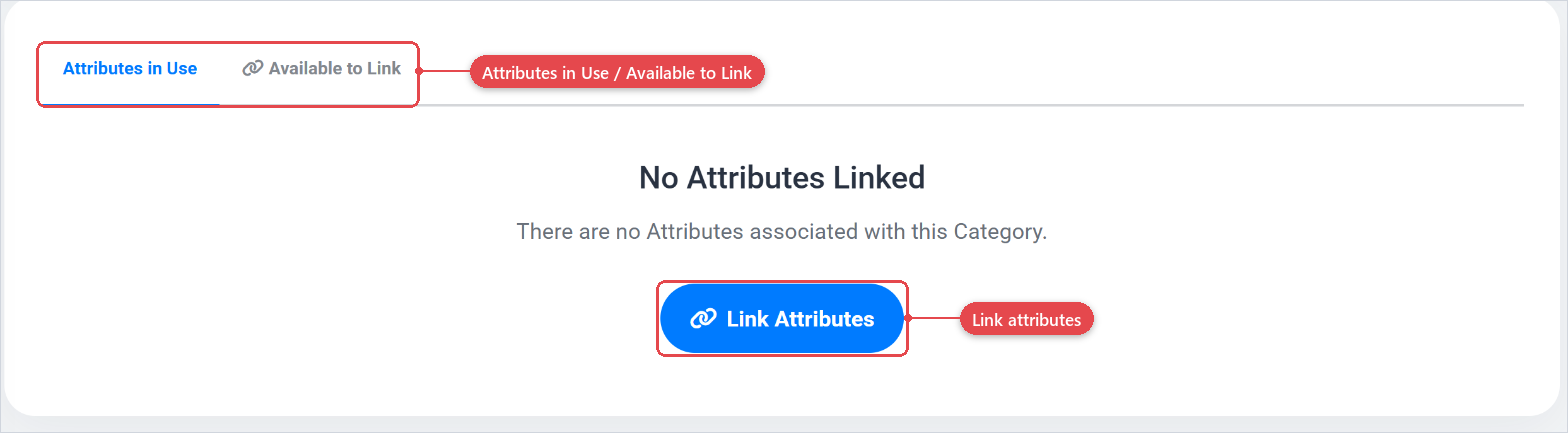
The Attributes section contains two tabs:
- Attributes in Use — lists the attributes already linked to this category.
- Available to Link — lists all attributes that are not yet linked. Select one or more and confirm to add them.
For more information on how attributes work, see the attributes documentation (Attributes).
Best practices
- Create one root category per major attribute domain (for example, "Colours", "Dimensions", "Materials") and nest further subcategories beneath them.
- Keep identifiers consistent and machine-friendly so that rules and integrations that reference attribute categories by identifier remain readable.