Rules in v2
Rules let you drive configuration logic at runtime: hiding or disabling options, auto-selecting values, computing numbers, and showing contextual warnings. Everything described here lives under Catalog › Rules in the backoffice.
When to use this rules section
Use the rules in this section when you need to:
- Show or hide attribute options based on what the shopper has already chosen.
- Compute a numeric attribute value from a formula that references other attributes.
- Surface a warning message when a combination is unusual or unsupported.
- Restrict which attributes or values are available based on the active catalog's countries.
Rules set up here govern configuration logic — what the shopper can choose and what happens when they choose it.
What is handled elsewhere:
- 3D visualization rules (which part becomes visible, which material slot changes) are configured separately: 3D visualization rules.
- Offset rules are also configured seperately in the 3D visualization rules.
- Pricing rules and price matrices belong in the pricing section: Prices.
- Product dependencies (connection modules that define which products can connect to each other, based on what each one provides and requires) are configured on the product: Dependencies.
Rule types
When you create a rule you choose one of two editors:
| Type | When to use |
|---|---|
| Decision Table | You have many combinations to cover. A spreadsheet-like grid lets you set up condition columns and action columns, then fill rows for each scenario. |
| Rule Builder | You have one or a small number of rulesets and prefer to build conditions and actions one by one with a guided sidebar. Supports nested condition groups. |
Both types share the same set of expressions (conditions and actions) described below.
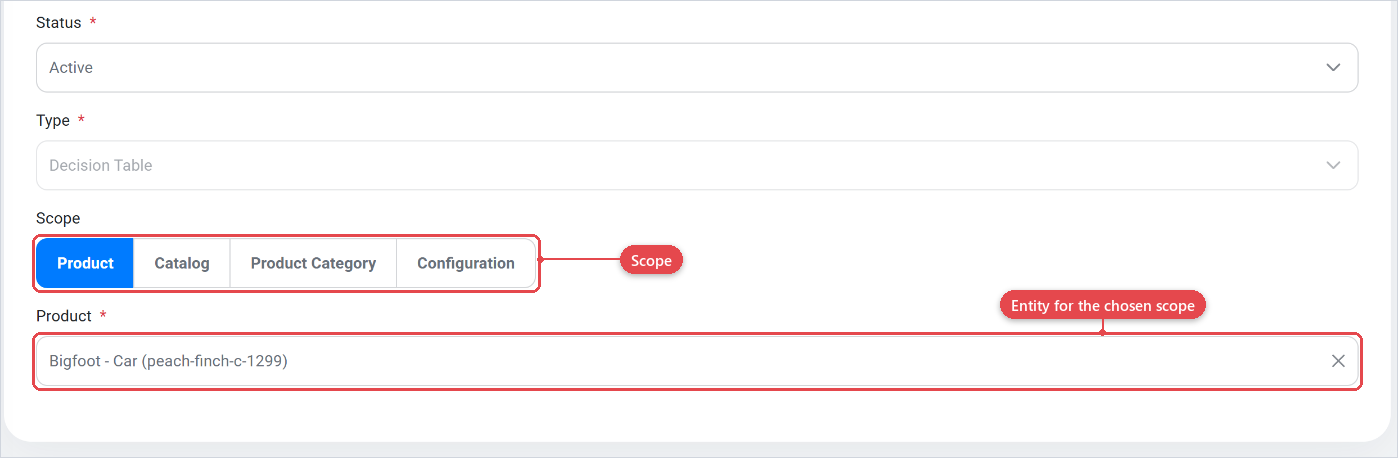
Scope
Every rule has a Scope that limits where it applies. The scope narrows evaluation to a single entity:
| Scope | Description |
|---|---|
| Product | Applies only when the shopper is configuring that specific product. |
| Catalog | Applies within a specific catalog. |
| Product Category | Applies to all products in the chosen product category. |
| Configuration | Applies within a specific configuration. |
Expression reference
An expression is either a Condition (something that must be true for the rule to fire) or an Action (what the rule does when its conditions are met). Most conditions support a Negate (NOT) toggle that inverts the check.
Conditions
A conditions can be seen as a When section of a ruleset, When the expression it true it will excecute the actions that come after it. In the rulebuilder all conditions in a group are combined with either AND (all must be true) or OR (any one must be true). In the descision table all conditions are always AND (all must be true).
Attribute value membership
| Condition | What it checks |
|---|---|
| Contains any of values | The current selection for an attribute includes at least one of the listed values. Supports negation. |
| Contains all of attributes | The configuration currently contains all of the listed attributes (i.e., every one of them has been given a value). |
| Contains any of attributes | The configuration currently contains at least one of the listed attributes. |
| Contains all of products | The configuration currently contains all of the listed products. |
| Contains any of products | The configuration currently contains at least one of the listed products. |
| Contains any of attribute categories | The configuration includes at least one attribute belonging to any of the listed attribute categories. |
| Contains any of attribute value categories | The selected values include at least one value belonging to any of the listed attribute-value categories. |
| Contains any of product categories | The configuration includes at least one product belonging to any of the listed product categories. |
Value state
| Condition | What it checks |
|---|---|
| Empty value | An attribute has no value selected. Toggle negation to check "is not empty". |
Numeric comparison
| Condition | What it checks |
|---|---|
| Compare numeric value of | Compares the numeric value of an attribute against a fixed number using one of the operators below. Supports negation. |
| Compare numeric values of | Compares the numeric value of one attribute against the numeric value of another attribute. Supports negation. |
Operators available for numeric comparisons:
| Operator | Meaning |
|---|---|
| equals | The values are equal. |
| does not equal | The values are not equal. |
| greater than | The left side is larger than the right side. |
| greater than or equal to | The left side is larger than or equal to the right side. |
| less than | The left side is smaller than the right side. |
| less than or equal to | The left side is smaller than or equal to the right side. |
String comparison
| Condition | What it checks |
|---|---|
| Compare string value of | Compares the string value of an attribute against a fixed text using one of the operators below. Supports negation. |
| Compare string values of | Compares the string value of one attribute against the string value of another attribute. Supports negation. |
Operators available for string comparisons:
| Operator | Meaning |
|---|---|
| equals | Text matches exactly. |
| does not equal | Text does not match. |
| contains | Text includes the given substring. |
| does not contain | Text does not include the given substring. |
| starts with | Text begins with the given prefix. |
| ends with | Text ends with the given suffix. |
Change tracking
| Condition | What it checks |
|---|---|
| Attribute changed by user | An attribute's value was most recently changed by the shopper. Supports negation ("was not changed by the user"). This can only be added as a secondary condition. |
| Attribute changed by system | An attribute's value was most recently set by a rule (automatically). Supports negation. This can only be added as a secondary condition. |
Catalog context
| Condition | What it checks |
|---|---|
| Catalog has any of countries | The active catalog is associated with at least one of the listed countries. Use this when a combination is allowed only in certain markets. |
Actions
Actions can be seen as a Do section of a ruleset. When all conditions in a ruleset are satisfied, every action in that ruleset fires.
Restricting attribute visibility and interactivity
| Action | What it does |
|---|---|
| Allow only attributes | Hides all attributes on the product except the listed ones. All other attributes become invisible to the shopper. |
| Disallow attributes | Hides the listed attributes. |
| Disallow attribute categories | Hides all attributes belonging to the listed attribute categories. |
| Disable attributes | Keeps the listed attributes visible but makes them non-interactive (greyed out). The shopper can see but not change them. |
Restricting value choices
| Action | What it does |
|---|---|
| Allow only values | For a given attribute, shows only the listed values. All other values for that attribute are hidden. |
| Disallow values | For a given attribute, hides the listed values from the shopper. |
| Disallow value categories | Hides all values belonging to the listed attribute-value categories for their respective attributes. |
| Disable values | For a given attribute, keeps the listed values visible but makes them unselectable. |
Auto-selecting and computing values
| Action | What it does |
|---|---|
| Select values | Automatically selects the listed values on a given attribute when the conditions are met. |
| Set computed value | Sets a numeric configurable attribute to the result of a formula. The formula can reference other attributes by name. Use this for calculated dimensions, quantities, or derived numbers. |
User feedback
| Action | What it does |
|---|---|
| Show warning | Displays a warning message in the configurator. You can optionally pin the warning to a specific attribute so it appears next to that attribute's selector. |
The Negate (NOT) toggle is available only on conditions, not on actions. Toggling it on a condition inverts the check. For example, "Contains any of values" becomes "does NOT contain any of those values".
When creating a filter on values always include the Attribute changed by user condition before selecting something. This way the end user will not be locked in the selection.