Dependencies
The Dependencies tab lets you define Connection Modules for a product. A connection module describes what connectors this product provides (outputs) and what it requires (inputs) from other products. This is used in bundle and modular-product scenarios where products must fit together — for example, a frame that provides a mounting connector and an accessory that requires the same connector.
Think of connection modules as a plug-and-socket system: a product declares what it can plug into and what sockets it exposes.
How connection modules work
Each connection module has a list of Provides connectors and a list of Requires connectors. When products are assembled in a bundle or evaluated by the configurator, Expivi can check that the required connectors of one product are satisfied by the provided connectors of another.
Connection modules are product-level: a single product can have multiple connection modules if it connects to other products in more than one way.
Create a connection module
- Open the product and click the Dependencies tab.
- Click Create next to the Connection Modules heading.
- Fill in the fields:
| Field | What it does |
|---|---|
| Name | A descriptive label for this module. |
| Identifier | A machine-readable key. Leave empty to auto-generate. |
| Description | Optional free-text note about what this module represents. |
| Provides | One or more connector types this product contains. |
| Requires | One or more connector types this product needs from another product. |
- Click Save.
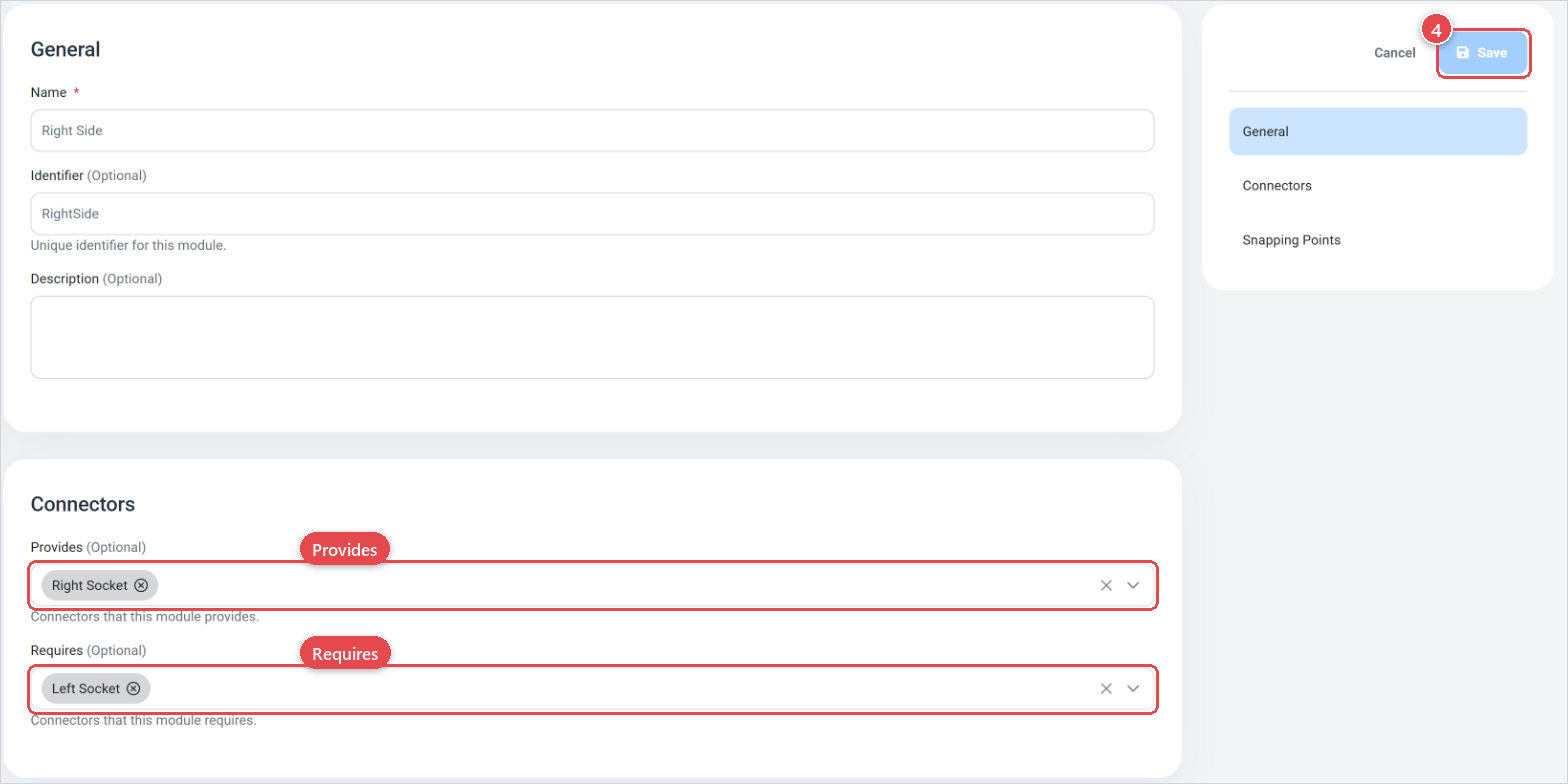
The connector types listed in Provides and Requires come from the shared connector library. If a connector type you need does not exist yet, create it in the connector management screen before setting up the module.
Use descriptive Identifier values for your connectors (for example, rail-mount-top rather than connector-1). Identifiers are used in rules and bundle logic, so clarity here saves time when troubleshooting.
Define connector types centrally and reuse them across products. A shared vocabulary means the system can reliably detect compatible products rather than relying on manual pairing.
If a product does not participate in modular assembly, you do not need to define any connection modules. Leave the Dependencies tab empty.
Connect modules in the 3D scene
Connection modules define which products can connect. To show where they attach in the 3D scene:
- Mark the attachment positions as connectors on the Offsets groups tab of the 3D visualization (Offset groups).
- Link each snapping point to a connection module in the Map to Connection Modules section of the visualization mapping (Visualization mapping).