Choose the right rule editor
Expivi has two rule editors. Use this page to decide which one a rule belongs in.
| Editor | Use it for | Where |
|---|---|---|
| 3D visualization rules | Visual behavior of the viewer and the 3D model | The Rules tab of a 3D visualization |
| Catalog rules | Configuration logic and dependencies between options | Catalog › Rules |
Visual rules
Use 3D visualization rules for anything that changes the viewer or the 3D model, such as camera switches or offset movements. These rules use the options of the 3D model, not the attributes under Catalog › Attributes.
To add one:
- Go to Visualization › 3D Visualization and open the visualization.
- Open the Rules tab.
- Click Add rule. The rule opens and you can start building it.

Dependency rules
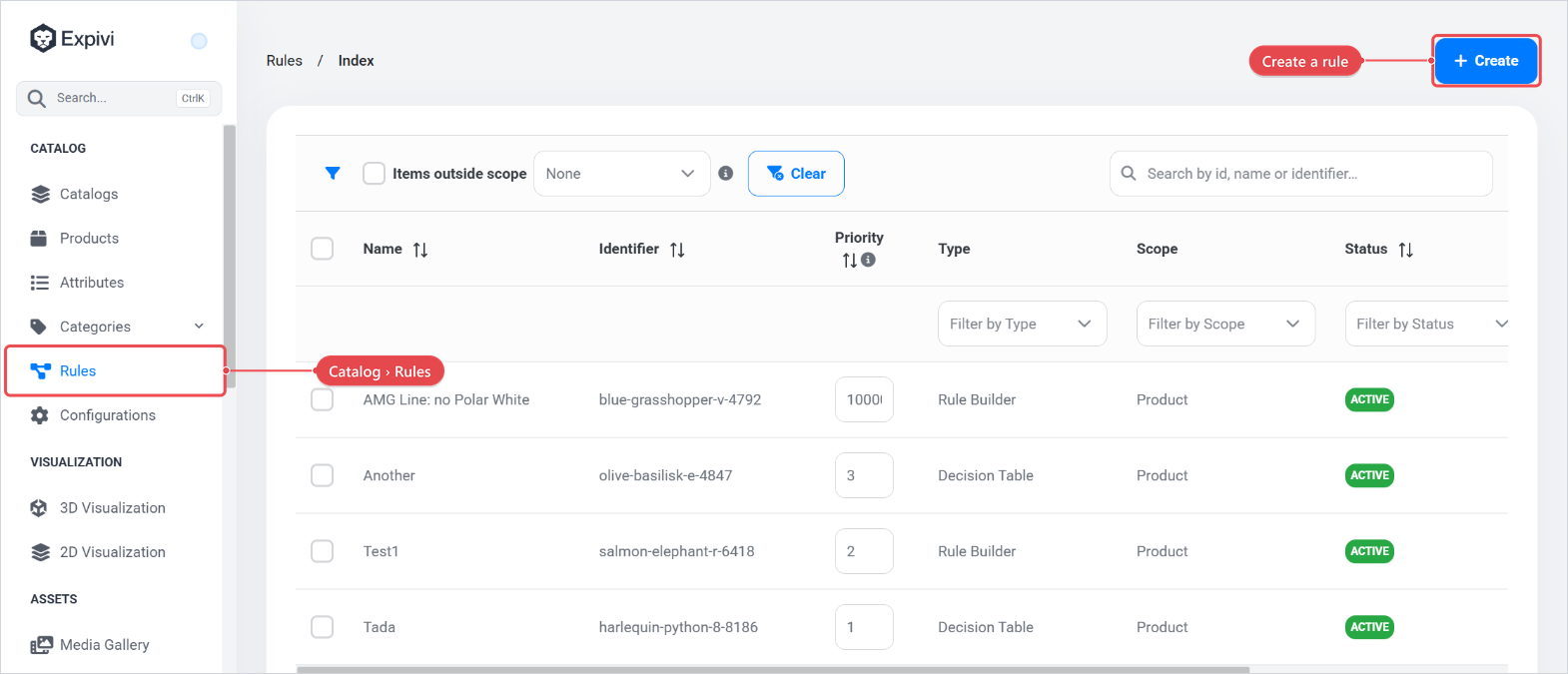
Use catalog rules for everything logic-related. There are two types:
- Rule builder: for simple "when … do …" rules.
- Decision table: for more complex rules.
To add one, go to Catalog › Rules and click + Create.
Which editor to use
| Action | Rule editor |
|---|---|
| Switch camera | 3D visualization rules |
| Switch texture map | 3D visualization rules |
| Offset rules | 3D visualization rules |
| Switch showcase views (light setup) | 3D visualization rules |
| Input connections (operable/set input) | 3D visualization or catalog rules |
| Visibility / Disable | Catalog rules |
| Option select | Catalog rules |
| Material rules | Catalog rules |