Constrained attributes
A constrained attribute is a filtered view of an existing configurable attribute. Instead of defining its own values, it inherits all values from a parent attribute and then narrows them down using attribute value categories. The result is a "subset" attribute that shares data with the parent but presents fewer choices.
This pattern avoids duplicating value lists across multiple products. You define the full colour palette once as a configurable attribute, then create constrained variants (for example "exterior colours" and "interior colours") that each show only the relevant subset.
When to use
- Two or more products share the same master attribute (for example "Material") but each product should only show a subset of the available values.
- You want changes to the master attribute's values (adding a new colour, renaming a material) to flow automatically to all products that use constrained variants of it.
- You need to reuse the same attribute identifier in rules or mapping but present different value sets per product (Rules in v2).
- You have a product that has multiple areas that can be customized with the same set of materials.
If each product truly has its own independent set of values, create separate configurable attributes instead.
How it works
A constrained attribute does not store its own values. At runtime it reads all values from the parent attribute and filters them by the Parent Attribute Value Categories you have configured. Only values that belong to at least one of the selected categories are shown.
Because the value type, value input type, and values all come from the parent, those fields are locked on the constrained attribute and shown as "(Inherited)".
Type-specific settings
| Setting | Required | Description |
|---|---|---|
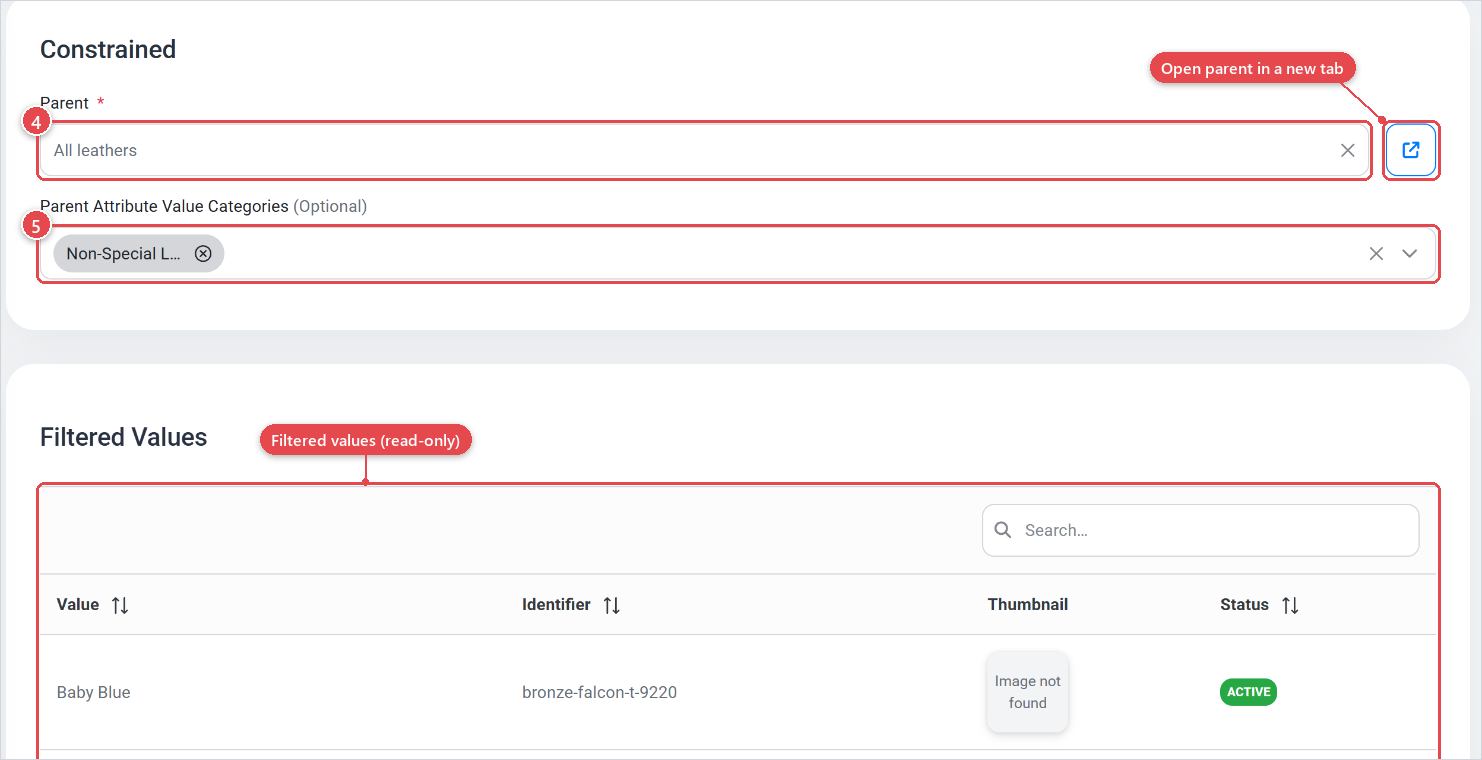
| Parent | Yes | The configurable (or other non-constrained) attribute whose values this attribute inherits. You can open the parent in a new tab using the arrow icon next to the selector. |
| Parent Attribute Value Categories | No | One or more attribute value categories (Attribute value categories) used to filter the parent's values. If you leave this empty, all parent values are available and the constrained attribute behaves like an alias of the parent. |
You cannot select another constrained attribute as a parent. The parent must be a Static, Configurable, or Bundle attribute.
Values (inherited)
The Values panel on a constrained attribute shows the values that remain after filtering. It is read-only: "There are no Remaining Values to this Constrained Attribute" appears if the category filter excludes all parent values. You cannot add, edit, or remove values directly on a constrained attribute. All changes are made on the parent attribute.
Identifier and value input type
The constrained attribute has its own Name, Identifier, Status, Thumbnail, Categories, Attribute Section, and Description. These are independent of the parent. The identifier is the key used to assign the constrained attribute to a product, so two products can each have their own constrained attribute (with different identifiers and different category filters) that both derive from the same parent.
Creating a constrained attribute
- Open Catalog › Attributes and click Create.
- Set Type to Constrained.
- Fill in Name and Identifier (optional).
- In the Settings card below, select the Parent attribute.
- Optionally select one or more Parent Attribute Value Categories to narrow the value set.
- Save the attribute.
You can also create constrained attributes via Bulk Create. Select Constrained as the type for a row, then open the row's Settings drawer to pick the parent.
Before creating constrained attributes, categorise the parent attribute's values using attribute value categories (Attribute value categories). For example, tag each colour value as "interior" or "exterior". Then create one constrained attribute per category, pointing to the same parent.
Use constrained attributes when the same attribute name and semantic meaning should appear on multiple products/parts but each product/part has a shorter value list. This keeps your catalogue normalised: one master attribute, many product-specific views. This also makes it easier to maintain
If you leave Parent Attribute Value Categories empty, the constrained attribute passes through all parent values. This can be useful as a temporary setup while you add category tags to the parent values, before going back and setting the filter.